ASPL User Manual v 1.00
© 2025 SetSphere.com
When comparing groups, it is useful to find elements that are equivalent to each other. The notion of determining what is being equivalent without being equal is a thoughtful process when comparing groups based on their semantic internal composition describing their constituent of subgroups and elements (in particular when these constituents are labels formed of strings or words). The mechanism of getting the equivalent subgroups and elements (between groups) is performed through some algebraic processor that can be represented by three symbols: / ~ r
From an algorithmic perspective, the processor is a selection routine that can be viewed as an iterative loop, within it, elements are being selected based on some regular expression matching rules. In ASPL, users can use the equivalence relation without knowing anything about the implementation of its selective processing routines.
Let's summarize the meaning of the three symbols: / ~ r
The r is the relation.
The ~ is used as the equivalence symbol and typically it precedes the relation; hence ~r means to apply the equivalence relation r.
The / is used as the quotient symbol and typically it follows the group name as to say get the quotient as the resulting parts (or partitions) represented in the group under the equivalence relation.
In ASPL, one can combine the three symbols, then suffix them to a set operator verb to denote the equivalence relation to be applied on the action of the operator, hence grouping the elements that are considered equivalent under that relation, and the resulting group is called the quotient set.
For example f&/~r means to get the elements intersection by applying the equivalence relation ~r.
To be more exact, f&/~r means to get the quotient set by performing the elements intersection operation while applying the equivalence relation ~r.
From ASPL operation perspective, we say the f& is stroked with the ~r, aiming at the quotient set of f& relative to the equivalence relation r.
■ Defining an Equivalence Relation
The user can define a relation to be used in an equivalence relation by using
The relationexpression is a comma delimited expression that may include
- frx=regex-to-match-element-names
- drx=regex-to-match-subgroups-names
- grx=regex-to-match-subgroups-or-element-names
- and any one of the following: c= c~ c~~ h= h~ h~~ mtm= mtm~ mtm~~ mtm< mtm<= mtm> mtm>= ks= ks~ ks~~
To define the relation to find the equivalent of all elements containing the word 'eclipse' within the subgroups containing the word 'planet', and whose attribute checksums are different, one can type:
aspl> q r := drx=.*planet.*,frx=.*eclipse.*,c~
    f& / drx=.*planet.*,frx=.*eclipse.*,c~
     | |        |              |         |
     | |        |              |         |
     | |        |              |         |
     | |        |              |         +-----> have different checksums
     | |        |              +---------------> element names regular expression
     | |        +------------------------------> subgroup names regular expression
     | +---------------------------------------> stroking for the Quotient Relation
     +-----------------------------------------> gets the elements intersection

   - named subgroups to match: .*planet.*
   - named elements to match: .*eclipse.*
   - predicate condition on the set operation: c~
The sample workspace DICERS contains the data for a simulation where three players are tossing dice. Let's set an equivalence relation to select the throws numbered 311 to 315, and 511 to 515, where the players have the same faces (that is the same checksums). We set the following equivalence relation represented by r
aspl> q r := drx=throw[35][1][1-5],c=
To display the equivalence relation as being seen by ASPL, you can simply type q followed by the relation symbol.
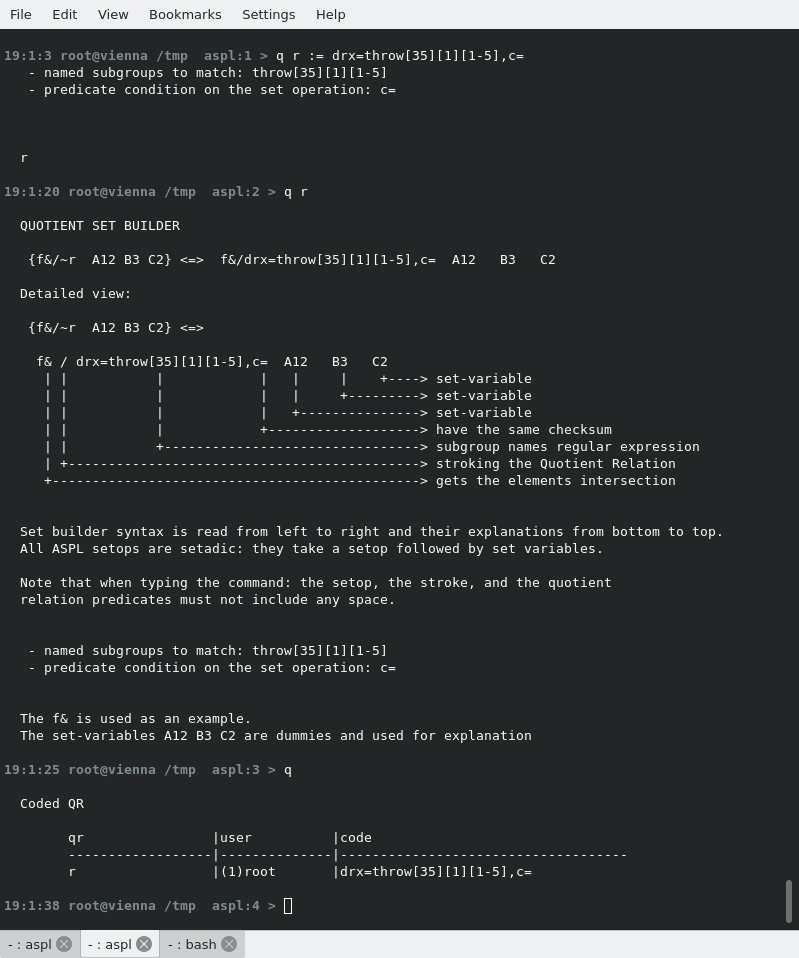
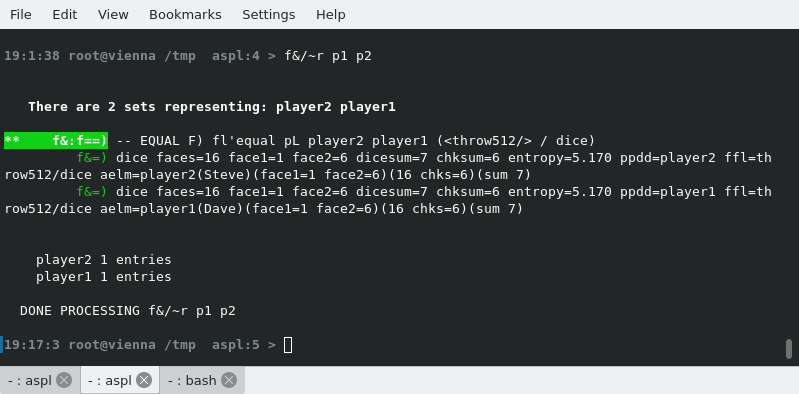
We apply the equivalence relation on the set intersection to realize when player1 and player2 throws have landed on the same faces for the throws 311 to 315 and 511 to 515.
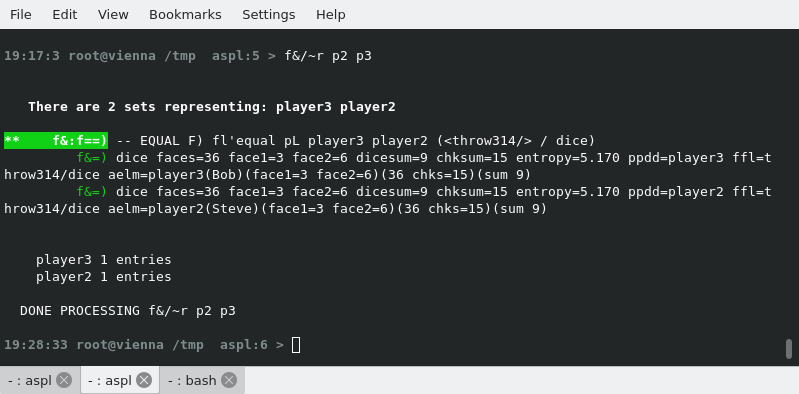
We can reuse the equivalence relation for player2 and player3.
■ Getting the Quotient Set For Event Listeners in JMX
To the end user, the UNIX filesystem consists of directories, subdirectories, and files that are represented by slash delimited strings. Such filesystem can be viewed as a convinient directory service that led computer language designers to take advantage of it. The Java is an object oriented language where packages are laid on the UNIX filesystem and parallel the UNIX directory tree structure: Java packages are structured on top of the UNIX directory structure, and Java classes are saved as files within the structure. It is trivial to save each Java class in its own file. Since ASPL grouping objects are also somehow structured based on the UNIX filesystem, we can take advantage of its quotient set processing capability to compare Java distribution packages.
In the following discussion, we will show how to use ASPL quotient set to compare JMX Jar distributions of IBM WebSphere Application Server. The method discussed is not restricted only to IBM WebSphere as it can be used to compare Java packages in general.
We want to compare the event listener Java classes between two JMX distributions: so let's find the quotient set for the event listeners found in two JMX Jar files. In this example we show how to apply the equivalence relation drx=.*event.*/i,frx=.*listener.*/i~ on the set intersection of two JMX Jar distributions to display the quotient set for JMX event listeners. You can start ASPL by loading the sample workspace JMXJARQR that is used in this section.
# aspl JMXJARQR
start ASPL loading JMXJARQR
aspl> q evn := drx=.*event.*/i
Define the equivalence relation evn
aspl> q evnlsn := drx=.*event.*/i,frx=.*listener.*/i
Define the equivalence relation evnlsn
aspl> DEF FN event := f&/~evn %%1 %%2
Define event() to get the intersection of the event between jmx1 and jmx2
aspl> DEF FN eventlistener := f&/~evnlsn %%1 %%2
Define eventlistener() to get the intersection of event listeners between jmx1 and jmx2
aspl> FN event(jmx1,jmx2)
Display the quotient set for the intersection of the event between jmx1 and jmx2
aspl> FN eventlistener(jmx1,jmx2)
Display the quotient set for the intersection of event listeners between jmx1 and jmx2
The last two operations are equivalent to the following where we bypassed the function definitions:
aspl> f&/~evn jmx1 jmx2
Display the intersection of the event between jmx1 and jmx2
aspl> f&/~evnlsn jmx1 jmx2
Display the intersection of event listeners between jmx1 and jmx2
aspl> q evn := drx=.*event.*/i
   - named subgroups to match: .*event.*/i

  evn

aspl> q evnlsn := drx=.*event.*/i,frx=.*listener.*/i
   - named subgroups to match: .*event.*/i
   - named elements to match: .*listener.*/i

  evnlsn

aspl> q

  Coded QR

        qr                |user          |code
        ------------------|--------------|------------------------------------
        evnlsn            |(1)root       |drx=.*event.*/i,frx=.*listener.*/i
        evn               |(1)root       |drx=.*event.*/i

aspl> DEF FN event := f&/~evn %%1 %%2

  event

aspl> DEF FN eventlistener := f&/~evnlsn %%1 %%2

  eventlistener

aspl> def

  Defined FNs:

        fn                |user          |code
        ------------------|--------------|------------------------------------
        eventlistener     |(1)root       |f&/~evnlsn %%1 %%2
        event             |(1)root       |f&/~evn %%1 %%2

aspl> FN event(jmx1,jmx2)
aspl> FN eventlistener(jmx1,jmx2)
● AN EQUIVALENCE RELATION TO GET THE QUOTIENT SET OF EVENTS IN JMX
AN EQUIVALENCE RELATION TO GET THE QUOTIENT SET OF EVENTS:
We need to obtain a quotient set which is "the set of all equivalence classes of a set under a given equivalence relation", where an equivalence class is a partition defined by using some equivalence relation.
We define an equivalence relation to build a quotient set, and use the notation S/~, which is read as "the quotient set of the set S under the equivalence relation ~". Now say S represents the group of JMX Java classes obtained by intersecting two groups represented by two set variables jmx1 and jmx2: f& jmx1 jmx2, so we can write the notation f&/~ which is read as "the quotient set of the set intersection operation f& under the equivalence relation ~."
For example, say the set intersection of all JMX Java classes in jmx1 and jmx2 is obtained with f& jmx1 jmx2, and ∼evn is an equivalence relation that means "matches the subgroups where the word 'event' occurs." and we define this evn in ASPL with q evn := drx=.*event.*/i which matches the subgroups containing the word 'event' (hence selecting the JMX management events).
So for some management event e and some other management event h, we can write: e ~evn h. With this equivalence relation, [e] is the equivalence class (or quotient class) that means "all events" is a partition of the set of all JMX management events. We can write [e]∼evn to be specific about which relation we are using to obtain the equivalence class. The quotient set f&/∼evn would be the set of all equivalence classes in f& representing the JMX management events, and to build its quotient set, we can list out all of the possible equivalence classes by writing it with set notation: f&/~evn = {[e]~evn | e ∈ f&}
● EXTENDING THE EQUIVALENCE RELATION TO GET THE QUOTIENT SET OF EVENT LISTENERS IN JMX
EXTENDING THE EQUIVALENCE RELATION TO GET THE QUOTIENT SET OF EVENT LISTENERS:
Now we want to extend the quotient equivalence relation to get the quotient set representing the event listeners, so we set the equivalence relation ~evnlsn that means "matches the subgroups where the word 'event' occurs and matches the elements where the word 'listener' occurs", note that the elements represent the Java classes; we define this evnlsn in ASPL as
q evnlsn := drx=.*event.*/i,frx=.*listener.*/i
So for some listener's event el and some other listener's event hl, el ~evnlsn hl. With this equivalence relation, [el] is the equivalence class that means "all event-listeners" is a partition of the set of all JMX management event listeners in f& jmx1 jmx2. We can write [el]∼evnlsn to be specific about which relation we are using to obtain the equivalence class. The quotient set f&/∼evnlsn would be the set of all equivalence classes in f& representing the JMX management listener's event, and to build a quotient set, we can list out all of the possible equivalence classes by writing it with set notation: f&/~evnlsn = {[el]~evnlsn | el ∈ f&}
# aspl JMXJARQR
(start ASPL loading the sample workspace JMXJARQR )
① aspl> q evn := drx=.*event.*/i
(define the equivalence relation for event)
② aspl> q evnlsn := drx=.*event.*/i,frx=.*listener.*/i
(define the equivalence relation for event listeners)
③ aspl> q evnstm := drx=.*event.*/i,frx=.*stream.*/i
(define the equivalence relation for event stream)
④ aspl> q trx := drx=.*transform.*/i
(define the equivalence relation for transform)
⑤ aspl> q trxtrx := drx=.*transform.*/i,frx=.*transform.*/i
(define the equivalence relation for transform-transform)
⑥ aspl> q con := drx=.*connector.*/i
(define the equivalence relation for connector)
⑦ aspl> q contrx := drx=.*connector.*/i,frx=.*transform.*/i
(define the equivalence relation for connector transform)
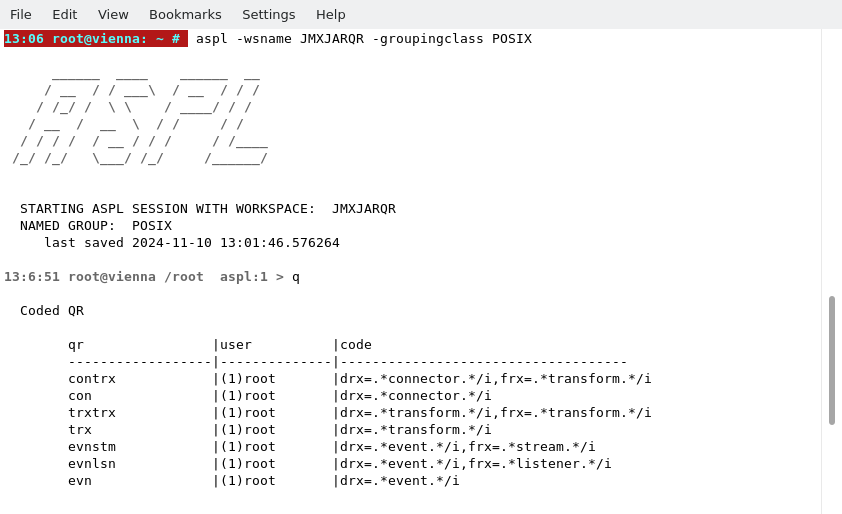
⑧ aspl> q
(print the equivalence relation table)
aspl> q evn := drx=.*event.*/i
   - named subgroups to match: .*event.*/i

  evn

aspl> q evnlsn := drx=.*event.*/i,frx=.*listener.*/i
   - named subgroups to match: .*event.*/i
   - named elements to match: .*listener.*/i

  evnlsn

aspl> q evnstm := drx=.*event.*/i,frx=.*stream.*/i
   - named subgroups to match: .*event.*/i
   - named elements to match: .*stream.*/i

  evnstm

aspl> q trx := drx=.*transform.*/i
   - named subgroups to match: .*transform.*/i

  trx

aspl> q trxtrx := drx=.*transform.*/i,frx=.*transform.*/i
   - named subgroups to match: .*transform.*/i
   - named elements to match: .*transform.*/i

  trxtrx

aspl> q con := drx=.*connector.*/i
   - named subgroups to match: .*connector.*/i

  con

aspl> q contrx := drx=.*connector.*/i,frx=.*transform.*/i
   - named subgroups to match: .*connector.*/i
   - named elements to match: .*transform.*/i

  contrx

aspl> q

  Coded QR

        qr                |user          |code
        ------------------|--------------|------------------------------------
        contrx            |(2)root       |drx=.*connector.*/i,frx=.*transform.*/i
        con               |(2)root       |drx=.*connector.*/i
        trxtrx            |(2)root       |drx=.*transform.*/i,frx=.*transform.*/i
        trx               |(2)root       |drx=.*transform.*/i
        evnstm            |(2)root       |drx=.*event.*/i,frx=.*stream.*/i
        evnlsn            |(2)root       |drx=.*event.*/i,frx=.*listener.*/i
        evn               |(2)root       |drx=.*event.*/i
⑨ aspl> DEF FN event := f&/~evn %%1 %%2
(define the function event)
⑩ aspl> DEF FN eventlistener := f&/~evnlsn %%1 %%2
(define the function eventlistener)
⑪ aspl> DEF FN eventstream := f&/~evnstm %%1 %%2
(define the function eventstream)
⑫ aspl> def
(print the defined functions)
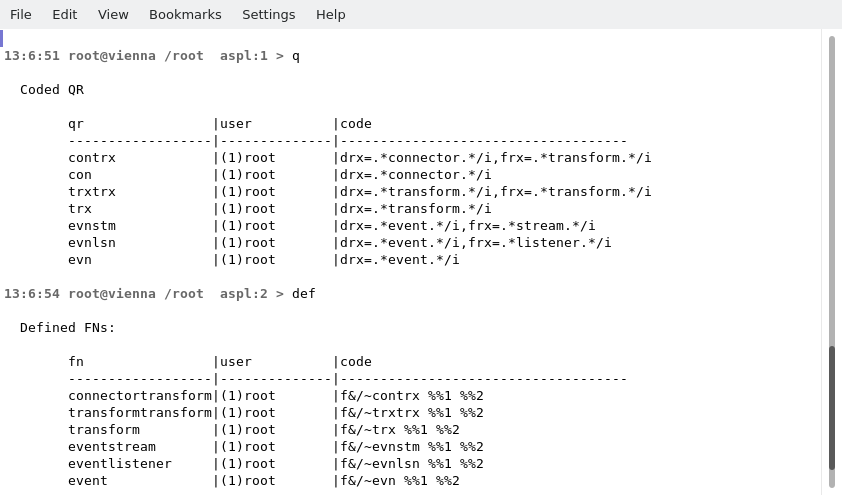
aspl> def

  Defined FNs:

        fn                |user          |code
        ------------------|--------------|------------------------------------
        connectortransform|(1)root       |f&/~contrx %%1 %%2
        transformtransform|(1)root       |f&/~trxtrx %%1 %%2
        transform         |(1)root       |f&/~trx %%1 %%2
        eventstream       |(1)root       |f&/~evnstm %%1 %%2
        eventlistener     |(1)root       |f&/~evnlsn %%1 %%2
        event             |(1)root       |f&/~evn %%1 %%2
⑬ aspl> v
(print the symbol table showing the set variables)
⑭ aspl> FN event(jmx1,jmx2)
(get the quotient set for events in f& jmx1 jmx2)
⑮ aspl> FN eventlistener(jmx1,jmx2)
(get the quotient set for event listeners)
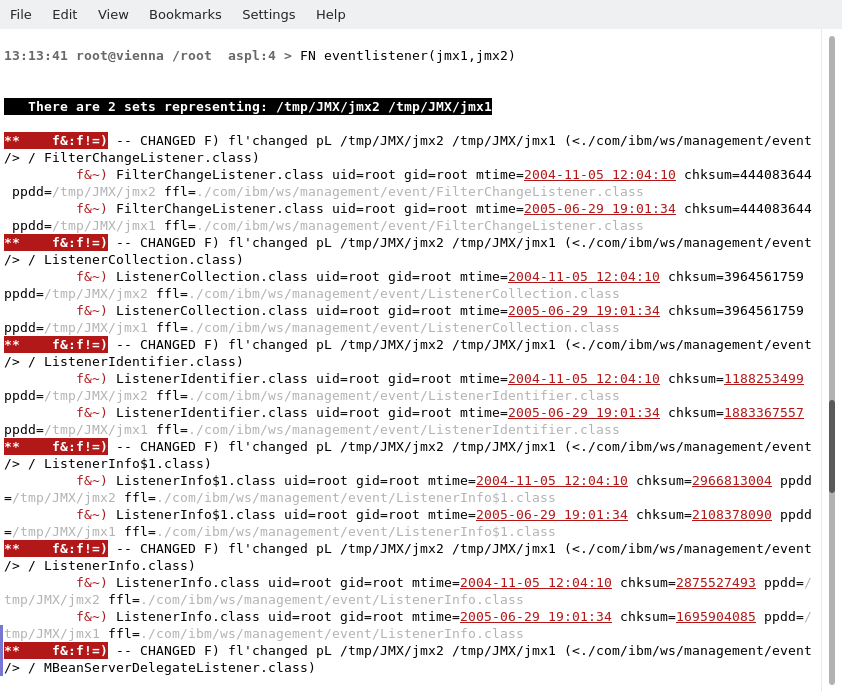
⑯ aspl> FN eventstream(jmx1,jmx2)
(get the quotient set for event stream)
⑰ aspl> FN connectortransform(jmx1,jmx2)
(get the quotient set for connector transform)
⑱ aspl> dm 3
(set dm display mode to 3)
⑲ aspl> ans
(print the answer stack)
# aspl JMXJARQR
(start ASPL loading the sample workspace JMXJARQR )
aspl> d&/drx=.*connector.*/i jmx1 jmx2
(get the subgroups labeled connector)
There are four connectors: interop, rmi, soap, and corba, in the JMX distributions represented by the set variables jmx1 and jmx2. These four connectors are shown in the following figure.
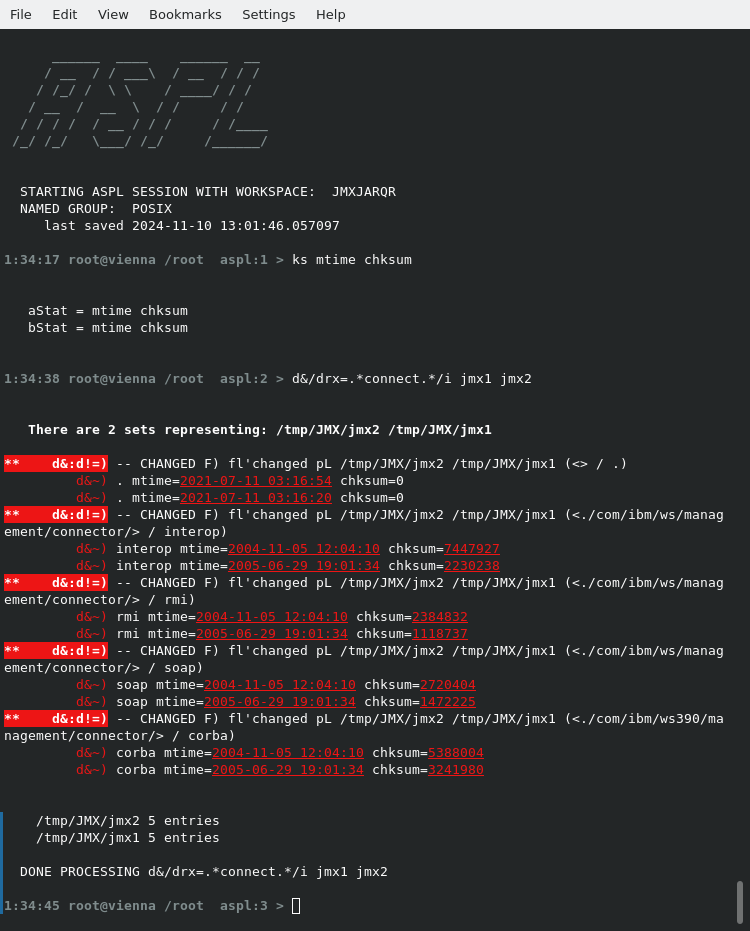
In this example we typed the equivalence relation directly following the stroke / without defining an identifier for the relation.
In general, you can expand a ~r by typing its representative relation explicitly following the stroke after the set operator.
■ Getting the Quotient Set For Processes in WebSphere Cloud
ASPL equivalence relations are powerful enough since they can match regular expressions at the subgroups and elements level. The advantage of defining a relation to be used as an equivalence relation is to avoid typing it over and over again after the set operator, in particular once one figures out the proper relation then it can be reused using its symbolic identifier in simple set operator expressions.
the expression you can just save it in the equivalence relation table and use it in a simple expression.
We start ASPL by loading the sample workspace WASCLOUDQR to show the usage of the equivalence relation to compare WebSphere processes in a cloud.
The set variable d_ps1jps1 represents the dataset of the process number 3042 using many libraries (excluding the Jar files).
The set variable d_ps2jps2 represents the dataset of the process number 27969 using many libraries (excluding the Jar files).
For example the following operations get the libraries used by process 3042:
aspl> wasps1 = gglsof(pno,3042,destem,/opt/IBM.*/WebSphere/AppServer,calchksum,1,calentropy,0)
get all files used by the process 3042
aspl> wasjps1 = gglsof(pno,3042,destem,/opt/IBM.*/WebSphere/AppServer,fext,jar,calchksum,1,calentropy,0)
get only these Jar files used by the process 3042
aspl> d_ps1jps1 = f\ wasps1 wasjps1
get the difference, then all libraries excluding the Jar files used by the process 3042
# aspl WASCLOUDQR
start ASPL loading the sample workspace WASCLOUDQR
aspl> f&/frx=.*java.* d_ps1jps1 d_ps2jps2
get the elements containing java followed by anything
aspl> f&/frx=.*java..* d_ps1jps1 d_ps2jps2
get the elements containing java followed by a character followed by anything
aspl> f&/frx=.*java\..* d_ps1jps1 d_ps2jps2
get the elements containing java followed by a character followed by a period followed by anything
aspl> f&/frx=.*java\.so$ d_ps1jps1 d_ps2jps2
get the elements containing anything but ending in java.so
aspl> f&/frx=.*j9.*\.so d_ps1jps1 d_ps2jps2
get the elements containing j9 followed by anything followed by .so
aspl> f&/frx=.*j9.*\.so$ d_ps1jps1 d_ps2jps2
get the elements containing j9 and ending with .so
aspl> f&/frx=.*j9...24\.so$ d_ps1jps1 d_ps2jps2
get the elements containing j9 followed by three characters followed by 24.so
aspl> f&/frx=.*j9...24\.so$/i d_ps1jps1 d_ps2jps2
get the elements containing j9 followed by three characters followed by 24.so ignore the case
aspl> f&/frx=.*j9...24\.so$/i,c= d_ps1jps1 d_ps2jps2
get the elements containing j9 followed by three characters followed by 24.so ignore the case, have same checksum
aspl> f&/frx=.*j9...24\.so$/i,c~ d_ps1jps1 d_ps2jps2
get the elements containing j9 followed by three characters followed by 24.so ignore the case, have different checksum
aspl> f&/drx=.*\/lib64\/ d_ps1jps1 d_ps2jps2
get the subgroups containing /lib64/
aspl> f&/drx=.*\/lib64\/.*\/ d_ps1jps1 d_ps2jps2
get the subgroups containing /lib64/.*/
aspl> f&/drx=.*\/(lib64|jre)\/ d_ps1jps1 d_ps2jps2
get the subgroups that have either lib64 or jre
aspl> f&/drx=.*\/(lib64|amd64)\/ d_ps1jps1 d_ps2jps2
get the subgroups that have either lib64 or amd64
aspl> f&/drx=^((?!.*jre.*).)*$ d_ps1jps1 d_ps2jps2
get these subgroups excluding "jre"
aspl> f&/drx=^((?!.*jre.*).)*$,frx=^((?!.*\.so.*).)*$ d_ps1jps1 d_ps2jps2
get these subgroups excluding "jre" and the elements not containing .so
aspl> f&/drx=^((?!.*jre.*).)*$,frx=^((?!.*\.so$).)*$ d_ps1jps1 d_ps2jps2
get these subgroups excluding "jre" and the elements not ending in .so