ASPL User Manual v 1.00
© 2025 SetSphere.com
Every system has its environment variables already defined and initialized with some values. At the shell prompt, type the command env to display these variables known to your current shell session started on the system. Since these variables get to be initialized through many scripts, some originating in the system's profile (somewhere relative to the /etc directory) and some other being sourced from the user's home directory (like ~/.bashrc), then two users may have different environment variables on the same system.
However, some of these environment variables dictate the startup and the behavior of applications launched on the same system, and two users may wonder why the startup of an application is not the same when started on the shell prompt. Even if the startup of the application is the same on the system, yet the application run time reflects different behavior when started by the two users (since the environment variables may have different values).
A similar situation can be seen in a cloud environment where systems are expected to have the same environment variables, and a system administrator may wonder why a middleware application is behaving differently on some systems. In this case, a middleware administrator has to dig deep to reveal these hidden values.
Just consider the situation where a variable specifies the maximum size of an XML object to be transmitted in the flow of a business object application, causing a problem escalation since data being sent is not being received at the other end! Armed with the script, envcompare.pl, the administrator can compare the system environment variables across the systems.
Here is a script, envcompare.pl, that can demistify the setting of environment variables on different systems. The script envcompare.pl displays a visual comparison between the ENV (environment) across many UNIX host servers. The hosts must be ssh'able from where the script is run. The environment of each host is saved as a group represented by a set variable, then ASPL set operators are invoked to compare the ENV of the hosts.
1.     #!/usr/bin/perl
2.
3.     use strict;
4.     use warnings;
5.
6.     # envcompare.pl compares the ENV across host names
7.     # envcompare.pl -host host1 -host host2 [-host host3 ..] [-view
      comp2sets,sim]]
8.     # envcompare.pl -host mm01 -host vienna
9.
10.    usage() unless @ARGV > 1;
11.    sub usage { print join "",<DATA>; exit; }
12.
13.    my @hosts;
14.    my $view = "sim";
15.    my $dbg = 0;
16.
17.
18.    while (@ARGV) {
19.        if ($ARGV[0] eq '-host') {
20.            shift @ARGV;
21.            my $host = shift;
22.            push(@hosts,$host);
23.        }
24.        elsif ($ARGV[0] eq '-view') {
25.            shift @ARGV;
26.            $view = shift;
27.        }
28.        elsif ($ARGV[0] eq '-dbg') {
29.            shift @ARGV;
30.            $dbg = 1;
31.        }
32.        elsif ($ARGV[0] eq '-help') {
33.            usage();
34.        }
35.        else {
36.            die "UNKNOWN OPTION $ARGV[0]\n\n";
37.        }
38.    }
39.
40.    usage() unless @hosts >=2;
41.
42.    my $interpreter = "aspl -groupingclass SYSENVGROUP -wsname TRANSIENT
      -singlepass -dm 3";
43.
44.    # NOTE shebang arguments take priority over interpreter preceding -STDIN
45.    #my $shebang = "#!/opt/ASPLv1.00/bin/aspl -groupingclass SYSENVGROUP -wsname
      TRANSIENT -singlepass -dm 1";
46.    my $shebang = "";
47.    my $s = "$shebang\n";
48.
49.    $s .= q~DEF FN cmp2sets := {gU {g\, %%1 %%2}{g\, %%2 %%1}{g&, %%1 %%2}}~ .
      "\n";
50.    $s .= "timeout 60\n";
51.    $s .= "displayoff\n";
52.
53.    # The host name can be used as the symbol of the ASPL variable, and it can
      also
54.    # be used as the label name of the ASPL variable.
55.    # We will create ASPL variables using the host names and labeling their grp1
      with
56.    # the same.
57.
58.    foreach my $host (@hosts) {
59.        if ($host =~ /^localhost$/i) {
60.            $s .= "$host = ggenv(grp1,$host)\n";
61.        }
62.        else {
63.            # remote hostname call ggenvR()
64.            $s .= "$host = ggenvR(grp1,$host,hostname,$host)\n";
65.        }
66.    }
67.    my @hosts2 = @hosts;
68.    my $t = $hosts2[0];
69.    $hosts2[0] = $hosts2[1];
70.    $hosts2[1] = $t;
71.
72.    my $ascmd = "";
73.    foreach (split(/\s*\,\s*/,$view)) {
74.        ($_ =~ /^union$/i)     && ($ascmd .= "gU  @hosts\n")      ||
75.        ($_ =~ /^funion$/i)    && ($ascmd .= "fU  @hosts\n")      ||
76.        ($_ =~ /^dnion$/i)     && ($ascmd .= "dU  @hosts\n")      ||
77.        ($_ =~ /^inter$/i)     && ($ascmd .= "g&  @hosts\n")      ||
78.        ($_ =~ /^finter$/i)    && ($ascmd .= "f&  @hosts\n")      ||
79.        ($_ =~ /^dinter$/i)    && ($ascmd .= "d&  @hosts\n")      ||
80.        ($_ =~ /^finterc$/i)   && ($ascmd .= "f&`c=  @hosts\n")   ||
81.        ($_ =~ /^finterc~$/i)  && ($ascmd .= "f&`c~  @hosts\n")   ||
82.        ($_ =~ /^fdiff$/i)     && ($ascmd .= "f\\  @hosts\n")     ||
83.        ($_ =~ /^fdiff2$/i)    && ($ascmd .= "f\\  @hosts2\n")    ||
84.        ($_ =~ /^sdiff$/i)     && ($ascmd .= "gD  @hosts\n")      ||
85.        ($_ =~ /^useq$/i)      && ($ascmd .= "f%U @hosts\n")      ||
86.        ($_ =~ /^iseq$/i)      && ($ascmd .= "f%& @hosts\n")      ||
87.        ($_ =~ /^sim$/i)       && ($ascmd .= "sim @hosts\n")      ||
88.        ($_ =~ /^simc$/i)      && ($ascmd .= "sim`fflc @hosts\n") ||
89.        ($_ =~ /^simz$/i)      && ($ascmd .= "sim`fflz @hosts\n") ||
90.        ($_ =~ /^comp2sets$/i) && ($ascmd .= "FN
      cmp2sets($hosts[0],$hosts[1])\n") ||
91.        die "\n  UNKNOWN SPECIFIER $_\n\n";
92.    }
93.
94.    $s .= "displayon\n";
95.    $s .= $ascmd;
96.    $s .= "v\n";
97.
98.    if ($dbg) { print "$s\n\n"; exit; }
99.
100.   open(ASPL, "| $interpreter -STDIN") or die "ERROR OPENING A PIPE TO aspl: $!
      \n";
101.   print ASPL $s;
102.   close ASPL;
103.
104.   __END__
105.
106.     Use ASPL run time interpreter to compare the ENV across machines
107.     in a cloud environment.
108.
109.     envcompare.pl  [-view SPECS] -host host1 -host host2 .. -host hostN
      [-dbg]
110.
111.      specifying the SPECS is optional, and its is formed of a comma delimited
112.      string of the following productions:
113.        union     displays the union of directories and files
114.        funion    displays the union of files
115.        dunion    displays the union of directories and subdirectories
116.        inter     displays the intersection directories and subdirectories
117.        finter    displays the intersection of files
118.        dinter    displays the intersection of directories and subdirectories
119.        finterc   displays the intersection where checksums are the same
120.        finterc~  displays the intersection where checksums are different
121.        fdiff     displays the difference between
122.        fdiff2    displays the difference between 2nd host and the 1st
123.        sdiff     displays the symmetric difference
124.        useq      displays the sequence alignment of the union
125.        iseq      displays the sequence alignment of the intersection
126.        sim       displays the similarity
127.        simc      displays the similarity for files with same checksum
128.        simz      displays the similarity for files with same ks
129.        cmp2sets  displays comparison of only the first two hosts
130.
131.      You can specify any of the SPECS in any order, and that is the order
132.      they will be displayed when the command terminate.
133.      When -view is not specified, then default to display the similarity.
134.
135.      At least two host names must be specified. If localhost is used
136.      then the ENV of the current host is gathered, and any other host name
137.      is treated as a remote host. The remote hosts must be ssh configured
138.      and ssh'able from the machine where this script is executed
139.      otherwise the script will fail to gather the ENV of the remote host.
140.
141.      For sequence alignment only the two hosts are subject to alignment, and
142.      specifying three hosts will mediate the alignment (see ASPL
      documentation).
143.
144.      -dbg   shows the ASPL code without executing it
145.
146.     Example:
147.      envcompare.pl  -host localhost -host mm02 -host mm03
148.      envcompare.pl  -host localhost -host vienna -view iseq,sim
149.
150.
We want to see the difference between two servers where IBM MQSeries Integrator has been installed. The following figure shows the difference between both servers; consider the difference between the CLASSPATH, LIBPATH, DISTHUB_PATH, and MQSI_EXMLTCONFIGPATH.
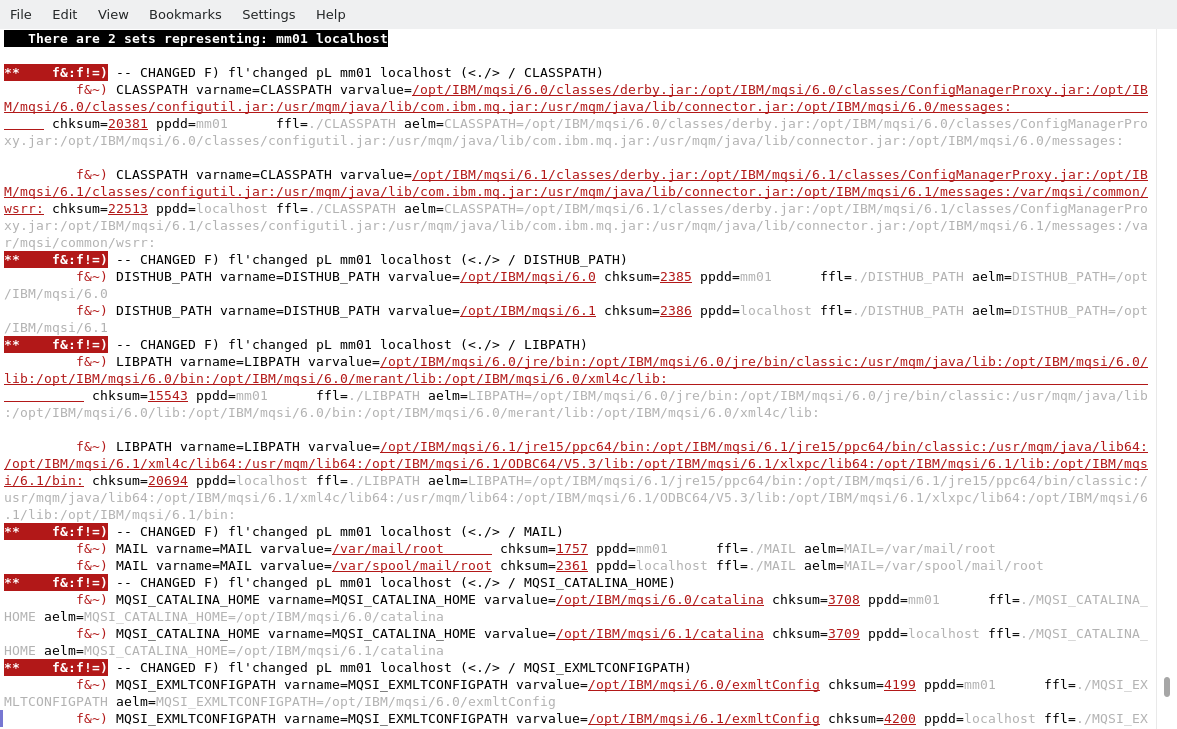
The following shows the terminal when we run
# envcompare.pl -host localhost -host mm01