ASPL User Manual v 1.00
© 2025 SetSphere.com
The UNIX filesystem can be viewed as a directory service where files are saved. The command ls lists the subdirectories and files in a directory. Here we want to monitor a directory tree structure in real time by globing the diretory content into a group then using ASPL set operators on it. This chapter consists of two sections. The first section shows to how monitor a directory on the UNIX filesystem using two scripts: dirchange-monitor-delta.sh and dirchange-monitor-delta-alternate.sh. The second section shows how to use ASPL iteration command from within an ASPL session to monitor and archive the directory changes.
■ Shell Scripts to Monitor Directories
In this section we present two scripts to monitor a directory tree on the Linux system. The following two Korn shell scripts invoke ASPL to monitor any change in a directory along its subdirectories and files. The script can be run on a terminal to find in real time changes in subdirectories and files. The monitoring method employed in here does not use any system service or any specialized application. The changes are being detected by simply interrogating a set variable in a loop. The directory content is turned into a group represented by a dataset, then the constituent of the group is being updated should any change be detected. The script gathers the changes in the group, every delta time interval, hence showing the differences in the directory: changes in subdirectories and files.
● Script dirchange-monitor-delta.sh
The following script, dirchange-monitor-delta.sh, monitors a directory on the UNIX system. Line 4 to 9 invokes ASPL to create a workspace DIRECTORY123 whose grouping class is POSIX, and create a set variable dirvar to gather the directory from the GG-function ggdir(). The workspace is saved temporarily, so lines 12 to 22 will load it then interrogate the dirvar set variable showing changes in a loop. Lines 25 to 27 will discard the workspace. The comparison is displayed comparing the initial directory with any subsequent changes.
1.      #!/bin/ksh
2.
3.      # warm up
4.      # create the workspace DIRECTORY123 and save the directory in dirvar
5.        asplcmd "  \
6.          createworkspace DIRECTORY123 POSIX;    \
7.          dirvar = ggdir(dir,$1);         \
8.          save; \
9.          quit; \
10.         "
11.     # loop 7 times with of 2 seconds delay in between
12.     for i in {1..7}
13.     do
14.       sleep 2
15.       asplcmd "                    \
16.         load DIRECTORY123;         \
17.         printblock ******* LOOP $i *******; \
18.         ks mtime chksum ppdd ffl;  \
19.         ? dirvar;                  \
20.         "
21.     done
22.
23.     # prompt to delete workspace DIRECTORY123
24.       asplcmd "  \
25.         wrm DIRECTORY123;                 \
26.         "
27.
On line 26, the script prompts the user to confirm the deletion of the workspace DIRECTORY123. Just delete it because there is not much being saved in it beside the original instance of the directory (saved on line 8).
The following figure shows the result when monitoring the directory /tmp/testdir1 using the script dirchange-monitor-delta.sh
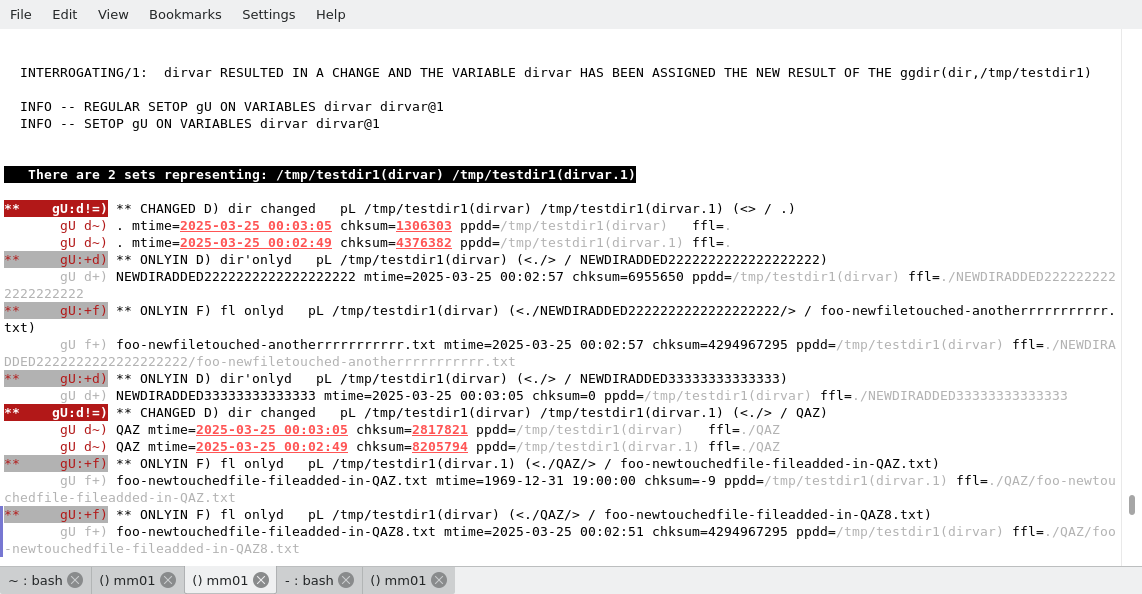
The following display shows the output as printed on the terminal when monitoring the directory /tmp/testdir1 using the script dirchange-monitor-delta.sh
● Script dirchange-monitor-delta-alternate.sh
In the script above, the changes have been cumulativaly displayed at the end of each loop. With a little change to the script, it is possible to effectively report the changes after each iteration in the loop. The following script, dirchange-monitor-delta-alternate.sh, shows if anything the alternating changes within the loop. Line 20, save, causes the dirvar variable to be saved, so everytime time we enter the loop, if the interrogation of the variable detects a change, then the previous data is archived and saved in the workspace at the end of each iteration.
1.      #!/bin/ksh
2.
3.      # warm up
4.        asplcmd "  \
5.          createworkspace DIRECTORY1234 POSIX;    \
6.          dirvar = ggdir(dir,$1);         \
7.          save; \
8.          quit; \
9.          "
10.
11.     # loop 7 times with of 2 seconds delay in between
12.     for i in {1..7}
13.     do
14.       sleep 2
15.       asplcmd "                    \
16.         load DIRECTORY1234;         \
17.         printblock ################### LOOP $i ###################; \
18.         ks mtime chksum ppdd ffl;  \
19.         ? dirvar;                  \
20.         save;                  \
21.         "
22.     done
23.
24.     # prompt to delete workspace DIRECTORY1234
25.       asplcmd "  \
26.         wrm DIRECTORY1234;                 \
27.         "
28.
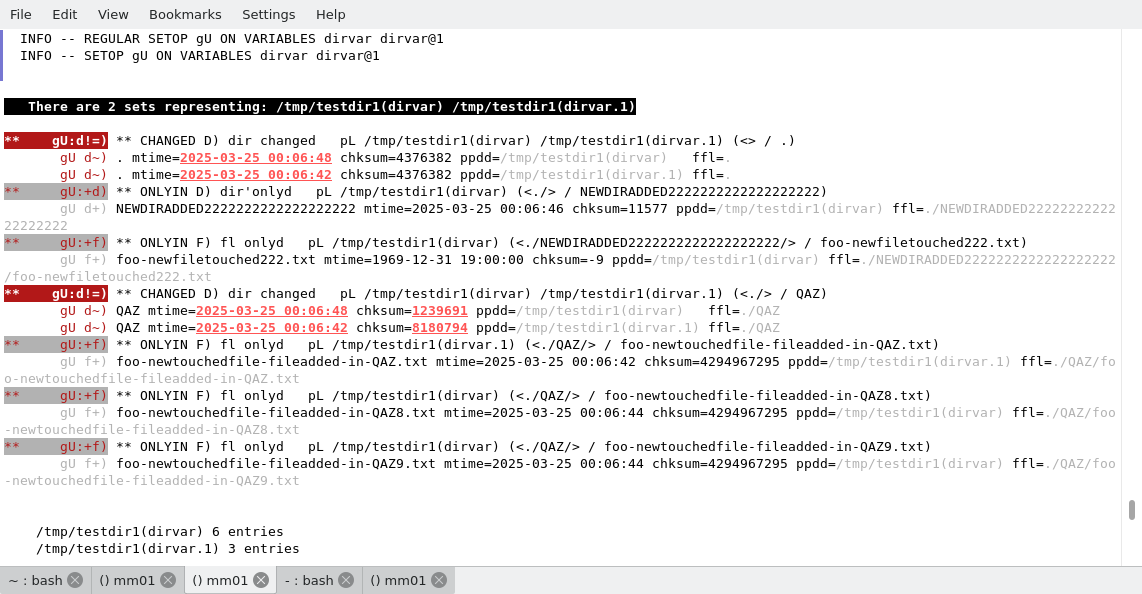
The following figure shows the result when monitoring the directory /tmp/testdir1 using the script dirchange-monitor-delta-alternate.sh
On line 26, the script prompts the user to confirm the deletion of the workspace DIRECTORY1234. You can preserve the workspace DIRECTORY1234 to start ASPL by loading it, and to further investigate the changes in the directory. Once you are done, simply delete the workspace by typing at the UNIX prompt: asplcmd "wrm DIRECTORY1234".
After monitoring a directory, one can review the changes following each iteration simply by using the the symmetric difference between the last updated set variable dirvar (line 20) and its archived data. Assuming we preserved the workspace DIRECTORY1234 by ignoring its deletion (line 26), we can start ASPL loading this saved workspace, then issue the commands to show changes captured in the archived data during the iterative loop:
# aspl DIRECTORY1234
aspl> @ dirvar
print the archived data for the set variable dirvar
aspl> ks mtime chksum ppdd ffl
aspl> ,gD`ks~ dirvar dirvar@1
show the group symmetric difference between final result and 1st captured changes
aspl> ,gD`ks~ dirvar@1 dirvar@2
show the group symmetric difference between 1st and the 2nd captured changes
aspl> ,fD`ks~ dirvar@1 dirvar@2
show the element or file changes between 1st and the 2nd captured changes
aspl> ,dD`ks~ dirvar@1 dirvar@2
show the subgroup or subdirectory changes between 1st and the 2nd captured changes
The following display shows the output as printed on the terminal when monitoring the directory /tmp/testdir1 using the script dirchange-monitor-delta-alternate.sh
■ Monitoring Directories From Within an ASPL Session
Both of the scripts shown previously have started ASPL in a shell loop, loading the ASPL interpreter with every iteration. There is no harm doing that since the session will be discarded and terminated by the end of each iteration. However one could have monitored the directory by starting ASPL only once in a session: here we start ASPL in a terminal then we set the variable dirvar to be associated with the directory of interest, then we gather the changes collected incrementally in the archived set variable.Shown below the commands to monitor the directory /tmp/aaaa1 from within an ASPL session. Assuming the workspace DIRECTORY12345 does not exist, here we start ASPL with some workspace named DIRECTORY12345 whose grouping class is POSIX, then we create the set variable vardir to glob the directory /tmp/aaaa1 by calling the GG-functioon ggdir(). The command ?10,4 vardir causes to interrogate vardir in a loop iteration: looping ten times with a delay of four seconds in between each iteration. Unlike the loop shown in the previous scripts, the iterations in here are within the same ASPL statement: checking for any change in the dataset associated with vardir, should any change be detected then the group is updated, and the old dataset is archived. The command v sorted prints the symbol table with all historical data. The command @sim vardir prints the similarity between vardir and all its historical.
# asplcmd 'wrm DIRECTORY12345'
remove the workspace DIRECTORY12345
# aspl -wsname DIRECTORY12345 -groupingclass POSIX
start ASPL with new workspace DIRECTORY12345
① aspl> vardir = ggdir(dir,/tmp/aaaa1)
glob directory /tmp/aaaa1 and assign it to set variable vardir
② aspl> ks mtime chksum ppdd ffl
set ks-vector to mtime chksum ppdd ffl
③ aspl> ?10,4 vardir
interrogate vardir looping 10 times with 4 seconds delay in between each iteration
④ aspl> @ vardir
print the archive of variable vardir
⑤ aspl> ,gD`ks~ vardir vardir@1
display the changes between final vardir and 1st iteration
⑥ aspl> ,gD`ks~ vardir vardir@2
display the changes between final vardir and 2nd iteration
⑦ aspl> ,gD`ks~ vardir vardir@3
display the changes between final vardir and 3rd iteration
⑧ aspl> ,gD`ks~ vardir vardir@4
display the changes between final vardir and 4th iteration
⑨ aspl> ,gD`ks~ vardir vardir@5
display the changes between final vardir and 5th iteration
⑩ aspl> ,gD`ks~ vardir vardir@6
display the changes between final vardir and 6th iteration
⑪ aspl> ,gD`ks~ vardir vardir@7
display the changes between final vardir and 7th iteration
⑫ aspl> ,gD`ks~ vardir@1 vardir@2
display the changes between 1st and 2nd iterations
⑬ aspl> ,gD`ks~ vardir@2 vardir@3
display the changes between 2nd and 3rd iterations
⑭ aspl> ,gD`ks~ vardir@3 vardir@4
display the changes between 3rd and 4th iterations
⑮ aspl> ,gD`ks~ vardir@4 vardir@5
⑯ aspl> ,gD`ks~ vardir@5 vardir@6
⑰ aspl> ,gD`ks~ vardir@6 vardir@7
⑱ aspl> ,gD`ks~ vardir vardir@1 vardir@3 vardir@4 vardir@5 vardir@6 vardir@7
display the changes between all iterations
⑲ aspl> ,gU`ks~ vardir vardir@1 vardir@3 vardir@4 vardir@5 vardir@6 vardir@7
display the unions of vardir and all iterations
⑳ aspl> ,dD`ks~ vardir vardir@1 vardir@3 vardir@4 vardir@5 vardir@6 vardir@7
display the changes of subdirectories between all iterations
⑴ aspl> ,fD`ks~ vardir vardir@1 vardir@3 vardir@4 vardir@5 vardir@6 vardir@7
display the changes of files between all iterations
To show the changes between the final result in dirvar and and its 1st captured archive, we can use the group symmetric difference expression statement gD dirvar dirvar@1 as such:
aspl> gD dirvar dirvar@1
show the group symmetric difference between 1st and the 2nd captured changes
aspl> fD dirvar@1 dirvar@2
show the files symmetric difference between 1st and the 2nd captured changes
aspl> ,gU dirvar@1 dirvar@2
show the group symmetric difference between 1st and the 2nd captured changes
The following are the ASPL commands to monitor a directory in real time on the UNIX system. An iterative loop is triggered by iterrogating the set variable vardir.