ASPL User Guide v 1.00
© 2025 Bassem W. Jamaleddine
In ASPL, the grouping of data is coherently realized with autogenerated modular processors that have the following features: (1) they are loadable classes managed by the interpreter containment engine, (2) they are specific in defining the kind of attributes, and (3) they have subroutines to emit each attribute. Specifying the kind of attributes is essential, since comparing strings is different than comparing numbers, and emiting a string is different than emiting a number. In addition, the value of an attribute can be non static and dynamically changeable (should it be bound to a processing subroutine or tied to a streamable device). You do not need to be involved in managing ASPL containment engine, as the creation and deletion of grouping classes is transparently done through the use of one simple command: metagrouping, and ASPL dynamic containment engine will pick up the rest of the work to load any grouping class you created.
ASPL power stems in its unique way to work on group algebraic data objects, a novelty in this premier calculator that operates on variables that represent structured GADg objects. GADg stands for Group Algebraic Data groups, and it is the base structured object that forms an ASPL group.
The GADg consists of subgroups and elements both of which have attributes that are described in their own element-grouping-class. That is the attributes of elements and subgroups of the GADg objects are described in the element-grouping-class (a set of classes and modules that are loaded by ASPL element-grouping-class-container: egC-Container). In general, GADg is created by a GG-function that must be in concordance with the element-grouping-class; hence each named GG-function is bound to one and only one named element-grouping-class: we use the adjective namedGClass to describe the name of a specific element-grouping-class; for instance, if you start ASPL by loading the namedspace TRIVIAL, the namedGClass ZEROGROUP is automatically loaded by the egC-Container.
Groups are different, for example a group of flowers and a group of cars are totally two different type of groups. Therefore, in ASPL, the making of the groups starts with the ELMD descriptor, a file describing the attributes of groups, subgroups, and their elements. This file descriptor has a unique name (the name of the grouping class, prefixed with the extension .ELMD), and one can issue the tilde axpansion ~elmd at the ASPL prompt to print its location.
Each element-grouping-class is identified by a unique name: for example if ACMEGROUP is such a name, then we say the namedGClass ACMEGROUP is the element-grouping-class that describes the attributes associated with the elements and subgroups. To work with datasets as described in the namedGClass ACMEGROUP, one needs to create a workspace whose metadata conforms to the namedGClass ACMEGROUP; let's call such namedspace ACMESPACE. Each namedspace is identified by a unique name, in addition its metadata must be bound to one of the already defined namedGClasses.
To create the namedGClass EMPTYGROUP, you will use the command metagrouping
# metagrouping -creategrouping EMPTYGROUP
# metagrouping -deletegrouping EMPTYGROUP
# metagrouping -creategrouping EMPTYGROUP
The program metagrouping is supplied with ASPL. The following shows the program and its options:
  metagrouping [-help]
       [-list]
       [-llist]
       [-listnamed]
       [-egcping NAMEDGROUP]
       [-checkgrouping NAMEDGROUP]
       [-creategrouping NAMEDGROUP [-attributes list-of-attribute]]
       [-creategrouping NAMEDGROUP [-displayphrase STRING] [-attributes list-of-attribute]]
       [-deletegrouping NAMEDGROUP]
       [-unlinkgrouping NAMEDGROUP]
       [-genenodes]
       [-listnamedphrases]

Where:

  -help                         Display this summary
  -list                         List the namedGClasses in the grouping class container by
                                  pinging each class and echoing whoami from the container
  -llist                        List the namedGClasses in the grouping class container
  -listnamed                    List the namedGClasses in the grouping class container
  -checkgrouping NAMEDGROUP     Check the NAMEDGROUP
  -creategrouping NAMEDGROUP    Create a new grouping class for the NAMEDGROUP in
                                  ASPL grouping container. To add attributes to
                                  the class to be created use -attributes option.
  -deletegrouping NAMEDGROUP    Delete the grouping class from ASPL grouping
                                  container
  -unlinkgrouping NAMEDGROUP    Same as -deletegrouping but interactive with Y/N prompt
  -exportgrouping NAMEDGROUP    Export a grouping class to a targetdir (INTERNAL USE ONLY)
  -targetdir DIR                Specify a target directory when using -exportgrouping
  -sunsetgrouping NAMEDGROUP    Sunset the grouping class (INTERNAL USE ONLY)
  -unsunsetgrouping NAMEDGROUP  Unsunset the grouping class (INTERNAL USE ONLY)
  -genenodes                    Generate Enodes (INTERNAL USE ONLY)
  -listnamedphrases             List the namedGClasses and their displayphrases

When creating a grouping class with additional attributes, each attribute
specified must be a word. The following attributes are always created and
cannot be specified: dosi entropy ppdd ffl chksum hmflgrp
Each attribute specified must be followed by a comma and its type. The
type is a single letter of the following: i f s t T c
where 'i' stands for integer, 'f' stands for float, 's' stands for string,
't' stands for 'tie', 'T' stands for autotie, and 'c' stands for code.
When 'c' is specified, then you need to follow it by a comma and the
symbol representing the code (which is also called TXT).
For attributes of type TXT, it is possible to specify an interval, as
shown in the example of BAYLEVELGROUP below.


Example:

    To create the element grouping class named FLOWERS, we say the namedGClass FLOWERS
      metagrouping -creategrouping FLOWERS -attributes "petals,i"  "season,s"
    Optionally we can add a displayphrase that is used as a description or a display-name
      metagrouping -creategrouping FLOWERS -displayphrase "GROUP FLOWERS BY THEIR PETALS" \
          -attributes "petals,i" "season,s" \

    To delete the element grouping class named FLOWERS
      metagrouping -deletegrouping FLOWERS

    To check the grouping class FLOWERS
      metagrouping -checkgrouping FLOWERS

    To validate by pinging the egC-Container for the element grouping class FLOWERS
      metagrouping -egcping FLOWERS

    To list and validate all namedGClasses loaded by the egC-Container
      metagrouping -list

    To partially recreate, just the GRNAME/Enode.pm (INTERNAL USE ONLY)
      metagrouping -genenodes

    To create the element grouping class BAYLEVELGROUP:
# metagrouping -creategrouping BAYLEVELGROUP    \
  -displayphrase "GROUP FOR SENSING WATER LEVEL BETWEEN TWO BAYS"  \
  -attributes "point1,t" "point2,t" "point3,t"  \
  "mean123,c,__mean123 point1 point2 point3"    \
  "point4,t" "point5,t" "point6,t"              \
  "mean456,c,__mean456 point4 point5 point6"

    Specify an interval to return a discrete string when the attribute value fall
    within that interval:

# metagrouping -creategrouping BAYLEVELGROUP  \
  -attributes "point1,t" "point2,t" "point3,t"  \
  "mean123,c,__mean123 point1 point2 point3  /[0.0,4.99] 1-5feet/[5.0,6.5] 5-6feet/>6.5 above7feet/" \
  "point4,t" "point5,t" "point6,t" \
  "mean456,c,__mean456 point4 point5 point6 /[0.0,4.99] 1-5feet/[5.0,6.5] 5-6feet/>6.5 above7feet/"

    ASPL Element-Grouping-Class can be manipulated using the command: metagrouping
    Check your ASPL book on howto issue the same command from within the ASPL interpreter.

   The metagrouping program is distributed with ASPL
   Copyright © 2021-2025 Bassem W. Jamaleddine
   Copyright © 2025 Total Computing & Network Design, Inc.
An element grouping class is a loadable module (that describes the GADg attributes) and it is managed by ASPL egC-Container.
You do not need to access the egC-Container directly as you will be using
the command metagrouping to create namedGClasses within the egC-Container
Once an element grouping class is created, you can validate its creation either by issuing the command metagrouping -egcping NAMEDGROUP or by pinging the containment (of the namedspace using it) at ASPL prompt by issuing the command egCwhoami.
Let's create the namedGClass EMPTYGROUP:
# metagrouping -creategrouping EMPTYGROUP
# metagrouping -listnamed | grep EMPTYGROUP
# metagrouping -listnamed | grep -v GROUP
# asplcmd "createworkspace JUNK EMPTYGROUP; egCwhoami"
JUNK is created in memory and will not be saved
# asplcmd "createworkspace JUNK EMPTYGROUP; save"
JUNK is created in memory then saved
# aspl -wsname JUNK -groupingclass EMPTYGROUP
aspl> bye
the bye is same as save followed by quit
# aspl JUNK
start ASPL by loading the namedspace JUNK
aspl> egCwhoami
ping the namedGClass in the egC-Container, namespace JUNK is bound to the namedGClass EMPTYGROUP
It is possible to ping the namedGClass EMPTYGROUP:
# metagrouping -egcping EMPTYGROUP
# metagrouping -deletegrouping EMPTYGROUP
# asplmgrp -list `asplcmd ~wsp`| grep EMPTYGROUP
show that JUNK is dangling
# aspl JUNK
this will fail with the message: THE ELEMENTS-GROUPING-CLASS "EMPTYGROUP" DOES NOT EXIST
# asplcmd "wrm JUNK"
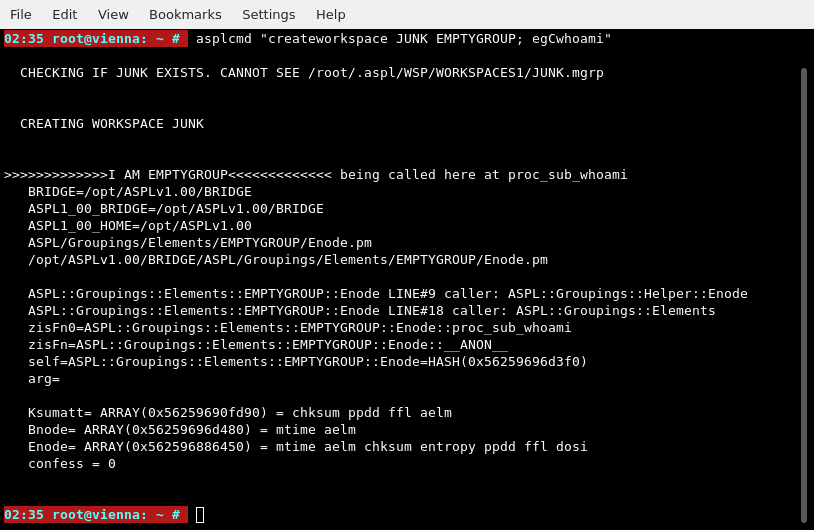
If you deleted the namedGClass EMPTYGROUP, and removed the namedspace JUNK, then issued the command:
# asplcmd "createworkspace JUNK EMPTYGROUP; egCwhoami"
Let's reiterate the creation of the namedGClass EMPTYGROUP and see the operations in the display:
# metagrouping -creategrouping EMPTYGROUP
# metagrouping -creategrouping EMPTYGROUP
# metagrouping -deletegrouping EMPTYGROUP
# metagrouping -creategrouping EMPTYGROUP
# metagrouping -list | grep EMPTYGROUP
# asplcmd "createworkspace JUNK EMPTYGROUP; egCwhoami"
# addstubGG EMPTYGROUP ggempty.pm
# asplcmd "ll ~gg | grep ggempty"
# asplcmd "ggls ggempty()"
The following display shows the operations as captured on a UNIX terminal:
Start ASPL to test with the namedspace JUNK whose element grouping class is EMPTYGROUP
# aspl -wsname JUNK -groupingclass EMPTYGROUP
aspl> a = ggempty()
aspl> b = ggempty()
aspl> em = {}
create the variable em as an empty set
aspl> v
aspl> equal a b
aspl> equal a em
aspl> equal a b em
aspl> gU a b em
aspl> ans
aspl> # a b em
aspl> quit
Here we show some of the element grouping class that we used in this User Guide.
# metagrouping -creategrouping TIE_OSCILLATORS_AREA_VARY_TIME_GROUP -attributes \
   "fosc1,t" "fosc2,t"   "n1,t" "n2,t" "fx,i"  \
   "sumarea1,c,__sumarea1"  "sumarea2,c,__sumarea2" "sumarea,i"  \
   "mtime1,t" "mtime2,t"  "sumarea1tm,c,__sumarea1tm" "sumarea2tm,c,__sumarea2tm"  "sumareatm,i"
# metagrouping -creategrouping TIE_OSCILLATORS_AREA_VARY_TIME_ATIME_GROUP -attributes  \
   "fosc1,t" "fosc2,t"   "n1,t" "n2,t" "fx,i"  \
   "sumarea1,c,__sumarea1"  "sumarea2,c,__sumarea2" "sumarea,i" \
   "mtime1,t" "mtime2,t"   "atime1,t" "atime2,t"  \
   "sumarea1tm,c,__sumarea1tm" "sumarea2tm,c,__sumarea2tm"  "sumareatm,i"  \
   "sumarea1tma,c,__sumarea1tma" "sumarea2tma,c,__sumarea2tma"  "sumareatma,i"