ASPL User Guide v 1.00
© 2025 Bassem W. Jamaleddine
15. 3Differential Group Variables
Use the operator @ to display a differential group variable
@ G where G is a set variable
Interrogating a set variable iteratively with delay may create a differential group variable
?5,1 G interrogate G looping 5 times with 1 second delay
Prefix the variable with @ to treat it as a differential group variable
,gU`ks~ @G applying the set operation ,gU`ks~ on @G
The set operation ,gU`ks~ is to get the labinated group union ticked with the predicate ks~
Similarity operation on a differential group variable
sim`fflz @G applying the similarity operation sim`fflz on @G
The operation sim`fflz is to display the simialrity on the matching containment names in the differential group variable
Differential Group Variables
In ASPL, variables are called set variables. A set variable, whose internal subgroups and elements changed over time, is termed a differential group variable. To display such a varaible, you will use the operator @
aspl>
To apply a set operator on the differential group variable G, you will prefix it with @@ G
this displays the differential group variable G along its historical
aspl>
,gU`ks~ @G
this applies the operation on the differential group variable G
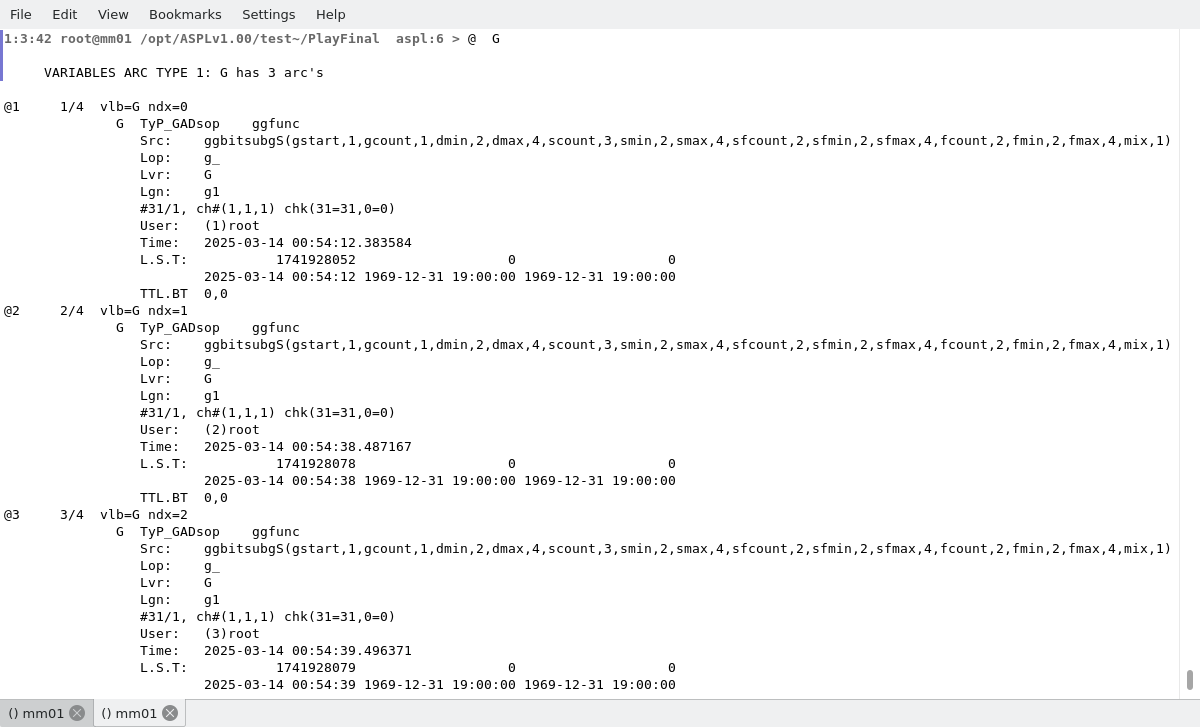
In the following example, we start ASPL by loading the sample workspace DGV_RANDBIT, we set the display mode to 5, then print the differential group variable G.# aspl -wsname DGV_RANDBIT -groupingclass BITGROUP ______ ____ ______ __ / __ / / ___\ / __ / / / / /_/ / \ \ / ____/ / / / __ / __ \ / / / / / / / / / __ / / / / /____ /_/ /_/ \___/ /_/ /______/ STARTING ASPL SESSION WITH WORKSPACE: DGV_RANDBIT NAMED GROUP: BITGROUP last saved 2025-03-14 00:58:53.155592 1:28:6 root@mm01 /opt/ASPLv1.00/test~/PlayFinal aspl:1 > dm 5 DISPLAY MODE SET TO 5 1:28:11 root@mm01 /opt/ASPLv1.00/test~/PlayFinal aspl:2 > @ G VARIABLES ARC TYPE 1: G has 3 arc's @1 1/4 vlb=G ndx=0 G TyP_GADsop ggfunc Src: ggbitsubgS(gstart,1,gcount,1,dmin,2,dmax,4,scount,3, ... Lop: g_ Lvr: G Lgn: g1 #31/1, ch#(1,1,1) chk(31=31,0=0) User: (1)root Time: 2025-03-14 00:54:12.383584 L.S.T: 1741928052 0 0 2025-03-14 00:54:12 1969-12-31 19:00:00 1969-12-31 19:00:00 TTL.BT 0,0 @2 2/4 vlb=G ndx=1 G TyP_GADsop ggfunc Src: ggbitsubgS(gstart,1,gcount,1,dmin,2,dmax,4,scount,3, ... Lop: g_ Lvr: G Lgn: g1 #31/1, ch#(1,1,1) chk(31=31,0=0) User: (2)root Time: 2025-03-14 00:54:38.487167 L.S.T: 1741928078 0 0 2025-03-14 00:54:38 1969-12-31 19:00:00 1969-12-31 19:00:00 TTL.BT 0,0 @3 3/4 vlb=G ndx=2 G TyP_GADsop ggfunc Src: ggbitsubgS(gstart,1,gcount,1,dmin,2,dmax,4,scount,3, ... Lop: g_ Lvr: G Lgn: g1 #31/1, ch#(1,1,1) chk(31=31,0=0) User: (3)root Time: 2025-03-14 00:54:39.496371 L.S.T: 1741928079 0 0 2025-03-14 00:54:39 1969-12-31 19:00:00 1969-12-31 19:00:00 TTL.BT 0,0 * vlb=G ndx=3 G TyP_GADsop ggfunc Src: ggbitsubgS(gstart,1,gcount,1,dmin,2,dmax,4,scount,3, ... Lop: g_ Lvr: G Lgn: g1 #31/1, ch#(1,1,1) chk(31=31,0=0) User: (4)root Time: 2025-03-14 00:54:40.505757 L.S.T: 1741928080 0 0 2025-03-14 00:54:40 1969-12-31 19:00:00 1969-12-31 19:00:00 TTL.BT 0,0
Notice the lines starting with Src: showing the source function that created the variable. The differential group variable G has been created by sourcing the function ggbitsubgS(), and you can view this function by typing ggls ggbitsubgS() at the ASPL prompt. This function creates random number of groups, subgroups, and elements. Calling this function at different time will result with different datasets. In ASPL, temporal changes in a set variable are being recorded within the variable itself, hence turning the set variable into a differential group variable.
The symbol @ is adopted as the command to display a differential group variable.For more explanation on how to interpret the output on operations carried out in ASPL on differential group variables, refer to the appendix ASPL Differential Group Operations Output Explained in ASPL User Guide.
To apply a set operation on a differential group variable, you will prefix the variable with @
In the following example we load the sample workspace DGV_RANDBIT to show the basic operations on creating a differential group variable named G.
① aspl>
G = ggbitsubgS(gstart,1,gcount,1,dmin,2,dmax,4,scount,3,smin,2,smax,4,sfcount,2,sfmin,2,sfmax,4,fcount,2,fmin,2,fmax,4,mix,1)
(interrogate the variable G in a loop, iterating three times with a delay of one second between each iteration)
② aspl>
?3,1 G
(interrogate the v1 set variable updating it)
③ aspl>
v
(display the symbol table)
④ aspl>
v sorted
(display the symbol table showing the archived variables)
⑤ aspl>
@ G
(print G and its archived historical data)
⑥ aspl>
,gU @G
(display the group union of the differential group variable G)
⑦ aspl>
,f&`ks= @G
(display the elements intersection where ks is the same)
⑧ aspl>
,fD`ks~ @G
(display the elements symmetric difference where ks is different)
⑨ aspl>
,fD @G
(display the elements symmetric difference)
⑩ aspl>
sim @G
(display the similarity in the differential group variable G)
⑪ aspl>
sim'`fflz @G
(display the similarity where elements are different in G)
This example is shown in the following terminal.
The variable internals can be revealed in more details by setting the display mode to 5: dm 5, for instance the following figure show the the differential group variable G after setting dm to 5.